Update
You can now turn off seat (East/South/West/North) recording
Thank you for using Janreco.
We received requests like "I just want to keep scores, so I'd like to skip entering seats (East/South/West/North)."
You can now choose whether to record seats!
What's new?
When "Seat recording" is turned off, you no longer need to select seats on the match recording form.
Just enter scores (or pt), and ranks and pt are calculated automatically as before.
Where to change it
-
My Page → "Seat recording" — applies to regular matches you record
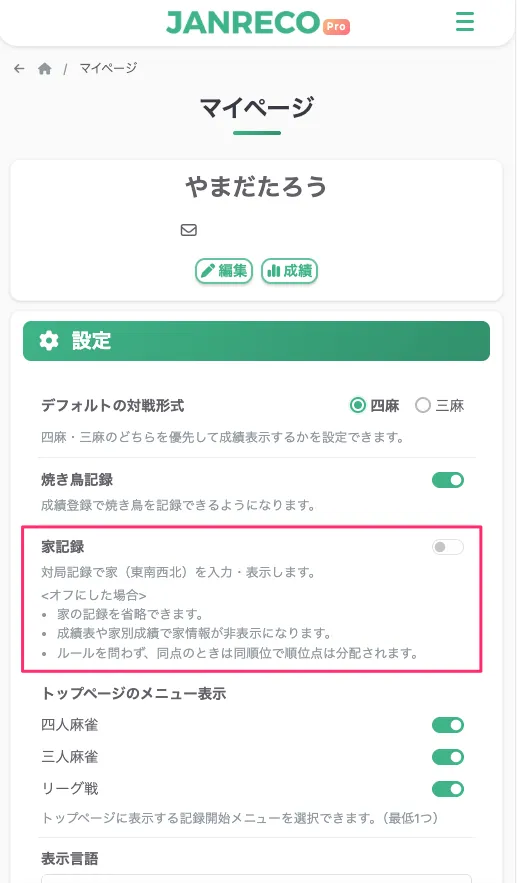 👉 Change it on My Page
-
League create / edit page → "Seat recording" — applies to matches in that league
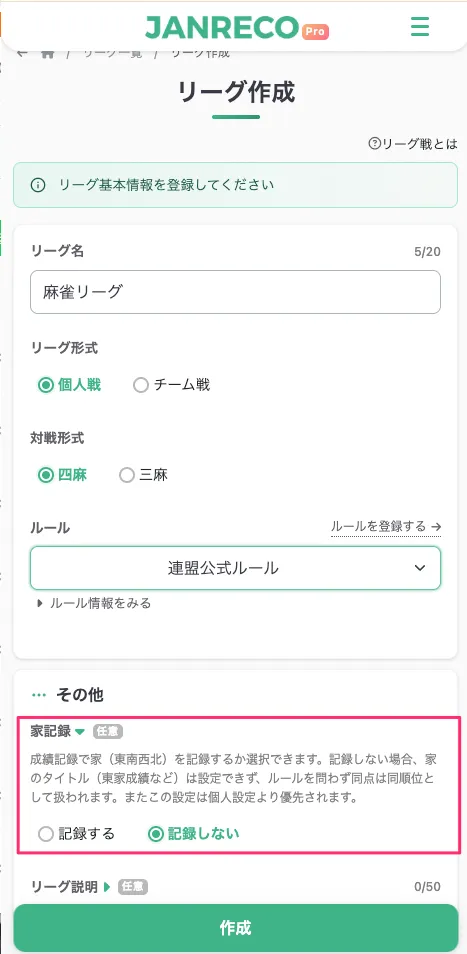
For league matches, the league setting overrides each member's personal setting.
(e.g. even if your personal setting is off, you enter seats when the league is set to "Record")
How matches without seats are handled
- Seats are not shown in match details or score sheets
- Ties are kept as shared ranks and rank points are split, regardless of the rule's tie setting
- These matches are excluded from Seat stats in Overall stats and league stats
- Leagues set to "Don't record" cannot use seat titles (East seat, etc.)
Notes
- The default is "Record" for everyone, including existing accounts and leagues. Nothing changes unless you turn it off
- Changing the setting later does not change already recorded matches (it applies to matches recorded after the change)
Availability
- Available to all users
Contact
If you have any questions, feel free to contact us via the form below.
Thank you for your continued support of Janreco.